Your cart is currently empty!


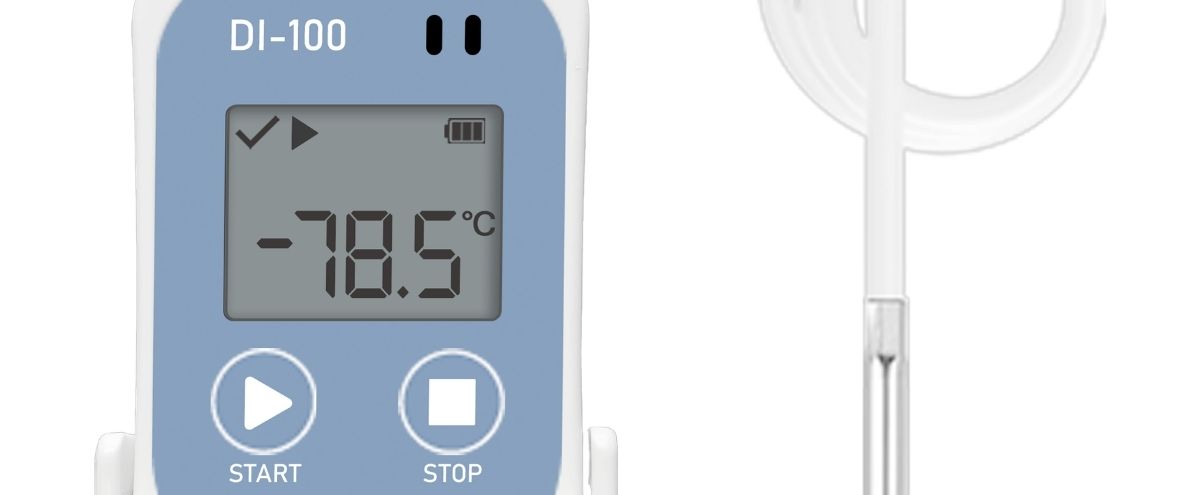
Temperature-sensitive shipments need more than the right packaging. You also need reliable temperature monitoring that shows what happened while your products were in transit. A shipment can leave a facility within its required range and still experience temperature changes during handling, air freight, storage, or final delivery.
That is why a DI100 Temperature Data Logger can be useful. Instead of relying only on the temperature at the start or end of a shipment, you can keep a record of conditions throughout the monitoring period.
For pharmaceutical, clinical, food, seafood, and other cold-chain operations, that record can help your team review temperature excursions, support quality checks, and make better decisions about a shipment.
A temperature-sensitive shipment is a product that must remain within a defined temperature range to maintain its required quality or condition. Pharmaceuticals, biologics, clinical materials, frozen foods, and seafood are common examples.
In cold chain logistics, maintaining the right environment is only part of the job. Your team also needs evidence of the conditions the shipment experienced.
WHO guidance identifies temperature monitoring as an important part of appropriate storage and transport practices for temperature-sensitive pharmaceutical products. WHO also notes that temperature mapping and monitoring are important for suitable pharmaceutical storage conditions.
Here’s the thing: a temperature logger does not keep a shipment cold by itself. Your packaging, refrigeration, handling procedures, and transport controls still matter. The logger provides a record that helps you understand whether those controls worked as expected.
One of the main reasons to use this type of data logging device is its wide operating range.
The DI100 measures from −100°C to +100°C. Tempnote lists accuracy of ±0.5°C from −80°C to +100°C and ±1.0°C from −100°C to −80°C, with 0.1°C resolution.
That range is especially relevant when your shipment uses dry ice or needs monitoring at very low temperatures.
The device can store 34,560 temperature values and lets you select recording intervals from 10 seconds to 18 hours.
Why does that matter? Suppose a pharmaceutical package passes through several transport stages. A single reading at delivery may not tell you what happened two hours earlier. A series of recorded readings gives your QA team a much clearer record.
The logger provides a user-configurable alarm range. This feature enables you to set alarm limits that satisfy your requirements, then review the recorded information within those limits.
This is useful during deviation reviews. Your team can ask practical questions such as:
The goal is not to claim that a logger prevents an excursion. Its value is in recording and documenting temperature conditions, so your team has useful evidence.
As a USB Temperature Data Logger, the device connects to a computer through USB 2.0. It can generate PDF and CSV reports from the recorded data.
That gives you two practical formats. A PDF can be useful for routine review and documentation, while CSV data can be used for additional analysis within your own systems.
The published sample report also shows information such as recorded values, minimum and maximum temperatures, average temperature, alarm information, and a temperature graph.
For QA teams, temperature data is useful because it turns an assumption into a documented record.
The device is listed with CE, RoHS, and EN 12830 certifications, and a hard-copy validation certificate is included. Tempnote also lists 21 CFR Part 11 compliance for the product.
There is an important point here. A data logger having a compliance-related feature or claim does not automatically make an entire shipping operation compliant. Your company still needs suitable procedures, validation, record controls, staff training, and other controls required for your specific operation.
The FDA explains that Part 11 applies to certain electronic records and signatures when organizations rely on electronic records in place of paper records under applicable requirements.
That is why your QA team should assess the complete record process, not just the monitoring device.
The DI100 datasheet lists applications including sea freight, air freight, storage and freezer monitoring, distribution, and last-mile delivery.
For medicines and biologic materials, monitoring can help your team review whether recorded conditions remained within the required range.
A range down to −100°C makes the device relevant to shipments that require very low-temperature monitoring.
Research materials and other temperature-sensitive materials may require careful monitoring during transit. Your monitoring plan should always be based on the specific product requirements.
Frozen food and seafood exporters can use temperature records as part of their broader cold-chain procedures and shipment checks.
You can get more value from your Digital Temperature Data Logger by following a simple process:
Think of your product and your shipping requirements first, rather than random alarm limits.
Choose an interval of time that corresponds to the length of the shipment and the risk of small, fast changes in temperature.
Carry on with your approved monitoring and packaging. Do not assume merely placing the logger equates to the exact temperature of the product.
Look at the values and see if any alarms were triggered. Look at the overall temperature record.
Follow your organization’s QA and record retention policy regarding reports.
A Reusable Temperature Data Logger can make sense when your organization monitors temperature-sensitive shipments regularly.
The DI100 is listed as a multi-use model, uses a user-replaceable CR2450 battery, and has a stated 300+ day operating period on Tempnote’s product range page.
The right choice still depends on your shipment. If your job involves dry ice and uses multi-use devices, then a multi-use device may serve your needs better. If your job does not require dry ice shipments, then perhaps a different logger will work better.
Temperature-sensitive shipping is not only about keeping products within the right range. It is also about knowing what happened during transit.
An ideal DI100 Temperature Data Logger has features providing detailed temperature data, one customizable alarm, and the ability to save data to USB, as well as PDF/CSV reports. With its broad temperature range of −100°C to +100°C, DI100 can handle low-temperature applications such as dry ice.
Review the range of temperatures, the monitoring duration, the reports, and the compliance activities. The intent is to select the optimal temperature monitoring device for your specific job.
Take a look at the Tempnote DI100 Data Logger and see how it meets your cold chain monitoring needs.
A temperature data logger is a device that, unlike a temperature readings device, captures the temperature at various points/intervals in time.
Yes, it can work as long as it captures temperature data within the required range. The DI100 measures from −100°C to +100°C, making it useful for dry ice applications.
A temperature excursion is when product or shipment temperature conditions do not fall within the required or allowed range. The event should be investigated based on your company’s quality procedures.
Data logged information can be transferred to a computer for review. The DI100 can generate PDF or CSV reports after the data has been logged.
It really depends. For shipments that are continuous, a reusable temperature data logger could be beneficial. At the same time, a single-use data logger could be better in other circumstances.
The temperature data logger used should address the temperature range, duration, and reporting frequency; operational requirements and compliance; and the requirements of the customer.